
Is React easy to learn? An honest 2026 answer

Tien Nguyen
· 8 min read
Here’s the honest answer most “is React easy to learn” posts dodge by picking a side: React is easy to start and genuinely hard to master. The first hour feels great. The wall comes later, at hooks, state management, and the ecosystem around React.
And in 2026 there’s a twist nobody in the search results is talking about: AI changed where the hard part hides. It flattens the syntax barrier that used to stop beginners, and in exchange it introduces a quieter problem, code you can ship but can’t explain.
For where I’m coming from: I shipped React in production and learned it the pre-AI way, grinding through the docs and my own bugs. Now I watch juniors learn it AI-first. Both routes work. They fail in different places, and that’s most of this post.

So is React easy to learn, or not?
Both, and the split is clean once you see it.
The easy part is real. A component is just a function that returns markup. Props are just its arguments. Here’s a complete, working React component:
function Avatar({ src, name }) {  return <img className="avatar" src={src} alt={name} />;}
// use it anywhere:<Avatar src={user.avatarUrl} name={user.name} />
That’s the whole mental model for the first day: data goes in, UI comes out. Nothing here is hard, and this is why every “React is easy” post is telling the truth.
The hard part is also real, and it shows up at hooks. Here’s the single most common beginner bug in React, a counter that should tick up every second but freezes at 1:
// assumes: import { useState, useEffect } from 'react'function Counter() {  const [count, setCount] = useState(0);
  useEffect(() => {    const id = setInterval(() => {      setCount(count + 1); // count is frozen at 0 in here    }, 1000);    return () => clearInterval(id);  }, []); // empty deps: this effect only ever sees count === 0
  return <p>{count}</p>;}
The interval closes over count from the first render, where it’s 0, so it forever calls setCount(1). The first tick moves the display from 0 to 1; every tick after that sets it to 1 again, React sees the value hasn’t changed, and skips the re-render. So it sticks at 1. The fix is one character of insight, the updater form:
setCount((c) => c + 1); // gets the latest value, no stale closureNothing about the syntax is hard here. What’s hard is the model: closures, when effects re-run, what the dependency array actually controls. That is React, and it’s why “easy to start, hard to master” is the accurate answer.
What JavaScript do you need before React?
This is the prerequisite everyone mentions and nobody makes concrete. React is mostly modern JavaScript with a small API on top, so if the JavaScript is shaky, React feels like magic you can’t debug. The parts of React that trip people up (closures, scope, the this keyword) are really JavaScript, not React, and JavaScript has its own hard parts worth learning first.
You’ll use all of this constantly, from day one:
const names = users.map((u) => u.name); // arrow functions + map/filterconst { id, title } = post; // destructuringconst label = `Post ${id}: ${title}`; // template literalsconst data = await fetch('/api').then((r) => r.json()); // promises + async/awaitimport { useState } from 'react'; // ES modulesIf reading that made you pause, that pause is where React will hurt. The good news: this is exactly where AI helps most, and fastest. Fixing your JavaScript fundamentals with an AI tutor is a days-to-weeks project, not a months one, and it pays back the entire time you’re learning React.
How does AI change learning React in 2026?
This is the part the whole search results page misses. AI assistants (Claude, Copilot, ChatGPT) genuinely lower the barrier to React. They scaffold a component in seconds, explain a cryptic error, and unstick you when you’d have quit. For learning the syntax and getting moving, that’s a real gift.
The catch is a failure mode I’d call comprehension debt: working code you don’t understand. A beginner can now vibe-code a React app, ship features that look done, and hit a wall the moment something breaks, because they never built the model underneath. The useEffect bug above is trivial to generate and impossible to fix if you’ve never learned closures.
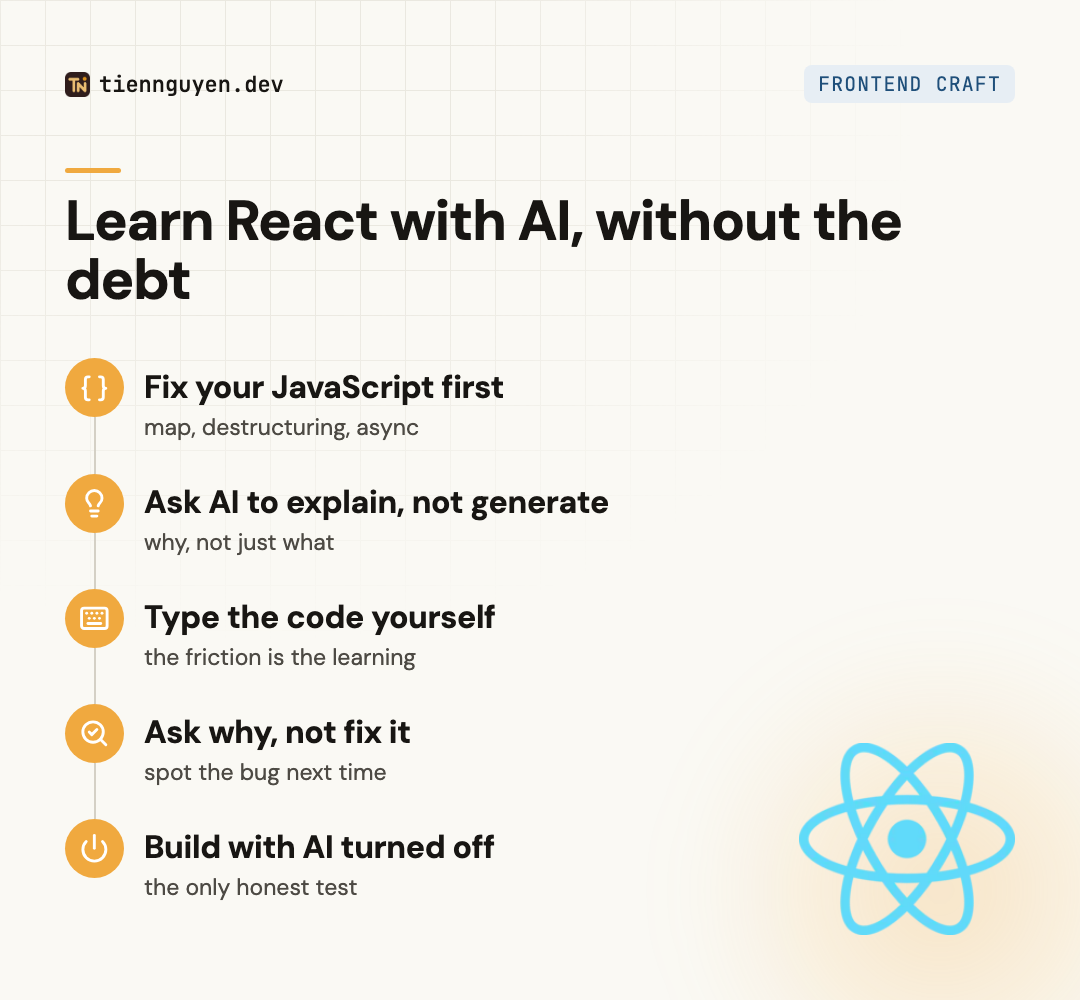
So the move isn’t “don’t use AI.” It’s use it to understand, not to avoid understanding:
- Ask it to explain code line by line, not just produce it. “Why does this effect run twice?” teaches you; “write me a todo app” doesn’t.
- Type the code yourself instead of pasting. The friction is where the learning is.
- Ask “why,” not just “fix it.” The fix is worthless if you can’t spot the bug next time.
- Every so often, build a small thing with AI turned off. That’s the only honest test of what you actually know.
Used this way, AI is the most patient React tutor you’ll ever have: available at 2am, and able to explain the same concept five different ways. Used the other way, it hands you an app you can’t maintain and calls it progress.
How long does it take to learn React?
Assuming your JavaScript is already solid, a realistic timeline:
- A few weeks to build simple apps: components, props, state, basic hooks.
- 2 to 3 months to be genuinely productive on real features.
- 6 to 12 months of actual projects to reach comfortable, job-ready React.
- Years for mastery, which is really “I’ve hit enough of the sharp edges to see them coming.”
If your JavaScript isn’t solid yet, add the weeks to fix that at the front. It’s the biggest variable in the whole estimate, and the one people most want to skip. For the actual step-by-step sequence to follow, here’s how to learn React in 2026.
Is learning React worth it in 2026?
Yes, and it’s not close. React has the largest ecosystem, the most jobs, and the most learning material of any frontend framework, which is exactly why React’s ecosystem dwarfs the alternatives like Solid and Svelte. Learning it is the safe bet, and the skills (components, state, thinking in UI) transfer to almost every other modern framework even if you later switch.
The AI angle doesn’t change that answer, but it does change the path. The barrier to entry is lower than it has ever been, and the discipline required to learn it well is higher, because the easy way out (let AI write it) is right there.
The takeaway
Is React easy to learn? Easy to start, hard to master, and in 2026 the hard part moved. AI erased most of the syntax pain that used to stop beginners, and replaced it with a subtler test: can you resist shipping code you don’t understand?
Learn the JavaScript first. Use AI to explain, not to avoid. Build things with it turned off sometimes. Do that, and React is more learnable in 2026 than it has ever been. Skip it, and you’ll have a working app and no idea why it works, which is the one place React is genuinely unforgiving.
Frequently asked questions
How long does it take to learn React?
With solid JavaScript already, you can build simple React apps in a few weeks and be genuinely productive in 2 to 3 months. Comfortable, job-ready React is more like 6 to 12 months of real projects, and mastery is a moving target measured in years. If your JavaScript is shaky, add time up front to fix that first. It's the single biggest variable in the timeline.
Is React hard for beginners?
The first hour is easy: a component is a function that returns markup. It gets hard at hooks, especially useEffect and its dependency array, at managing state as the app grows, and at the tooling and ecosystem around React. So React is easy to start and genuinely hard to master. Most beginners underestimate the second half because the first half feels so smooth.
Do I need to know JavaScript before learning React?
Yes, and this is the step people most want to skip. React is mostly modern JavaScript: arrow functions, destructuring, map and filter, template literals, promises and async/await, and ES modules. If those feel shaky, React will feel like magic you can't debug. Learn the JavaScript first. It pays back immediately, and AI makes brushing up on it fast.
Can I learn React with AI tools like Claude or ChatGPT?
Yes, and it's a real accelerator if you use it to understand rather than to avoid understanding. Ask AI to explain code line by line, to say why an error happened, and to review what you wrote. The trap is having it generate whole components you can't read or debug. That builds comprehension debt: working code you don't understand, which stalls you the moment it breaks.
Is React harder than JavaScript?
React is easier than the JavaScript underneath it, because React itself is a small API (components, props, state, effects). The difficulty is that React assumes you already know the JavaScript. So React feels hard mostly when your JavaScript is weak. Strengthen the language and React stops feeling like a separate hard thing and starts feeling like a library you use.
Keep reading
Tien Nguyen
· 7 min read
How to learn React in 2026: the AI-first roadmap
How to learn React in 2026: a step-by-step AI-first roadmap. The JavaScript to learn first, what to build, and how to use AI as a tutor without faking it.
Read article
Tien Nguyen
· 8 min read
How to master React in 2026 (when AI writes the code)
How to master React in 2026: AI writes competent React now. The render model, re-renders, state architecture, and effects, past the tutorials.
Read article
Tien Nguyen
· 9 min read
React Query vs Redux: the wrong question, and the right one
React Query vs Redux is the wrong question: one is server state, one is client state. Plus the real fight (RQ vs RTK Query) and the pattern AI still writes.
Read articleLiked this? Let's build something.
I take on a small number of front end and AI-engineering projects, and I'm always up for talking shop. Tell me what you're working on.