
Is shadcn/ui worth it? The honest 2026 tradeoff

Tien Nguyen
· 7 min read
Here’s the shortest honest answer to “is shadcn/ui worth it”: yes, if you want to own your components and you’ll accept the bill that comes with owning them. shadcn’s whole model: instead of installing a component library, you copy its source into your project and keep it. That single fact is the entire upside and the entire cost.
So the verdict up front: adopt shadcn when you’re a Tailwind-and-React team that wants a bespoke design system and is willing to maintain component code. Skip it when you want components handed to you and upgraded for you, or you won’t own that maintenance. For context: I work in React and build on Tailwind day to day, which is exactly the stack shadcn is made for, so this is a lived-in read of the tradeoff rather than a hype piece.

What is shadcn/ui, exactly?
The one-line version, because the rest of the post depends on getting this right: shadcn/ui hands you component source code you generate and own, rather than a library you install. In its own words, “this is not a component library, it is how you build your component library.”
You add a component with a CLI, which drops the actual code into your project:
npx shadcn@latest add buttonThat button is now a file in your repo, styled with Tailwind, that you can edit however you like. Under the hood, the components use accessible primitives for behavior (keyboard, focus, ARIA). Historically that was Radix UI, and as of the July 2026 changelog, Base UI is now the default (Radix is still supported, not deprecated). The primitive handles the accessibility and behavior, Tailwind handles the styling, and the ownership is on you.
shadcn/ui is free under the MIT license, and it’s maintained by Shadab Ahmed (who goes by shadcn), a design engineer at Vercel who also co-created v0.
What’s the upside of shadcn/ui?
Everything people love about shadcn flows from that ownership:
- Full control. The component is a file you edit, not a black box you configure around. No fighting a library’s defaults.
- No version lock-in. There’s no package dictating your component API. Nothing upstream can force a breaking change on you.
- You ship only what you use. No library-wide runtime; just the components you added.
- It’s free (MIT), and it’s unusually good with AI tools. shadcn’s own pitch is “open code for LLMs to read, understand, and improve.” Because the code lives in your repo in plain form, AI assistants can actually read and edit your components, which is a real 2026 advantage.
If you’re a Tailwind-first React team, that list reads like a wish granted.
What’s the catch with shadcn/ui?
Here’s the part the glowing posts skip, and it’s the same fact wearing its other face: you own the code, so you also maintain it. There is no npm update for your shadcn components. When the upstream project fixes a bug or improves accessibility, that fix does not flow to you. You re-add the component or diff it by hand.
So the honest framing is bigger than “shadcn is free components.” The real trade is maintenance for control: the work moves from the library’s team onto yours. Whether that’s worth it depends entirely on whether your team wants that job.
The Base UI switch (July 2026): a live example
The freshest example makes the trade concrete: shadcn just changed its default primitive from Radix to Base UI (July 2026). If you copied Radix-based components months ago, that switch is now a decision on your side, not an automatic upgrade. shadcn ships a migration path to soften it, but the point stands: the maintenance is yours. A component library would have handled that migration behind a version bump. With shadcn, “behind a version bump” is a place that doesn’t exist.
Is shadcn worth it? Adopt when, skip when
Most write-ups sell the upside and skip the verdict, so here’s a clear one.
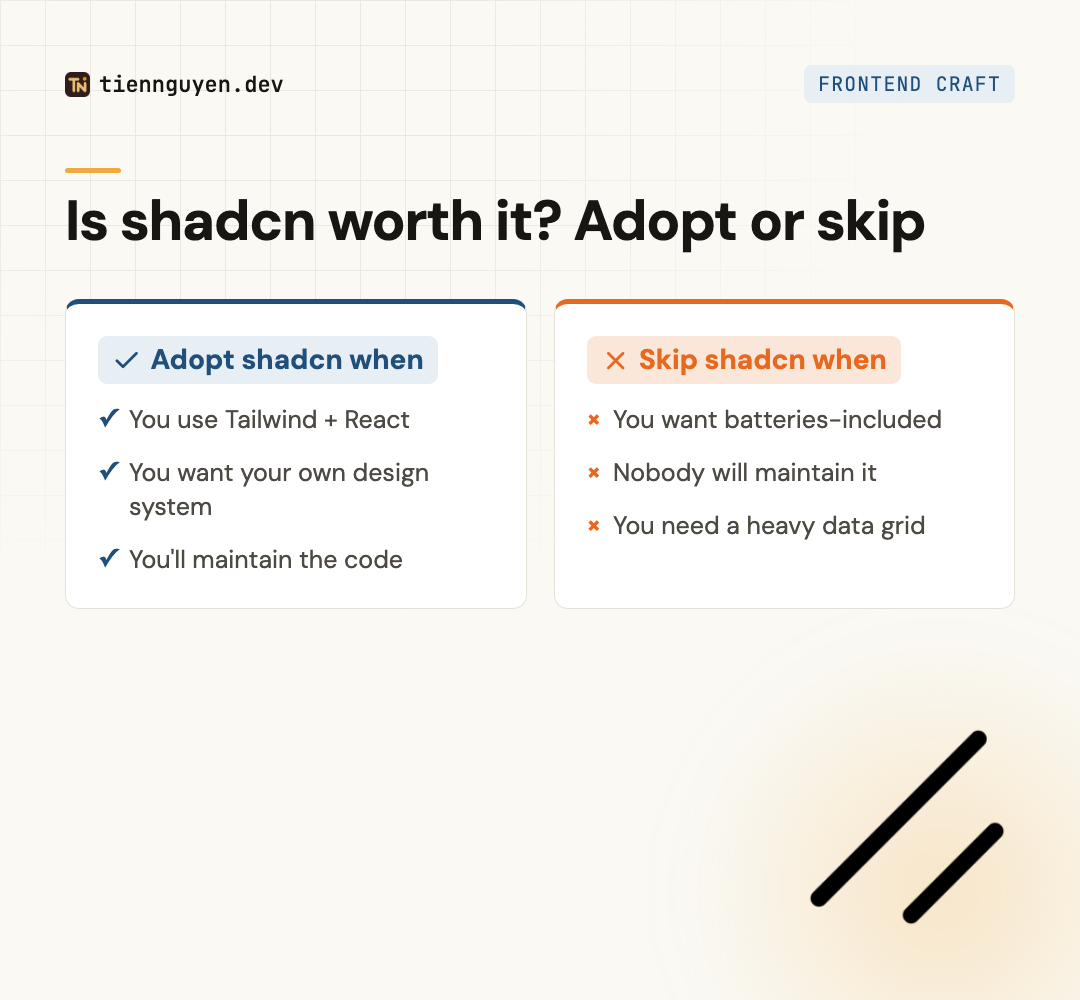
Adopt shadcn when:
- Your team already uses Tailwind and React, and is comfortable there.
- You want a design system that’s yours, with control over every component.
- You’re willing to own the components, including the occasional manual upgrade.
Skip shadcn when:
- You want components handed to you and upgraded for you with a version bump.
- Nobody on the team wants to maintain component code.
- You need something shadcn doesn’t give you off the shelf: a heavy enterprise data grid, or a non-React stack.
shadcn vs a component library
If shadcn’s ownership model isn’t what you want, the alternative is a traditional component library that hands you finished, upgradeable components. The two approaches line up cleanly:
| shadcn/ui | A component library (MUI, Chakra, Ant) | |
|---|---|---|
| What it is | Component source you copy and own | A package you install and import |
| Upgrades | Manual, no npm update | A version bump (npm update) |
| Control | Full: edit any component | Configure within its design |
| Accessibility | Via Radix / Base UI | Built into the library |
| AI tools | Read and edit your in-repo code | Read the library’s API |
| Best for | Bespoke design, Tailwind + React | Ship fast, batteries-included |
That’s the exact tradeoff I break down in Chakra UI vs Tailwind CSS (component library vs styling method) and Material UI vs Ant Design (two batteries-included libraries). shadcn sits on the opposite end: maximum control, maximum ownership, and the maintenance that comes with both. It’s the “build your own” answer to the same question those posts ask.
The takeaway
Is shadcn/ui worth it? For a Tailwind-and-React team that wants to own its design system, yes, and it’s one of the best ways to do that in 2026. The copy-paste-and-own model gives you control, no lock-in, and code your AI tools can actually work with. Just go in clear-eyed: the flip side of owning the code is maintaining it, and the recent Base UI switch is a live reminder that “no upstream” cuts both ways.
Pick shadcn when control is worth the maintenance. Pick a component library when you’d rather that maintenance stay someone else’s job. Both are right answers, to different questions.
Frequently asked questions
Is shadcn/ui free?
Yes. shadcn/ui is open-source under the MIT license, and there are no paid tiers. You install component source into your project with a CLI, and the code is yours to use and change. This is a real contrast with something like Material UI, where the advanced data grid features sit behind a paid MUI X license. With shadcn, the components themselves cost nothing.
Is shadcn/ui good for beginners?
It's not the gentlest starting point. shadcn assumes you're comfortable with React and Tailwind, and it hands you the component code to own and maintain rather than a tidy library to import. If you're brand new, a batteries-included library gets you moving faster. Once you know the basics and want control, shadcn is a great next step, especially since the code is easy for AI tools to read and edit.
Is shadcn/ui production-ready?
Yes, and it's widely used in production. Because you own the component code, it's as stable as you keep it: nothing upstream can break your build overnight. The flip side is that upstream fixes don't reach you automatically either. It's production-ready in the sense that mature teams ship it every day, as long as you accept that maintaining the components is now your job.
Is shadcn/ui better than Material UI?
They're different models, so 'better' depends on what you want. shadcn gives you component code you own and style with Tailwind, so you get full control and no version lock-in. Material UI gives you a ready-made, themeable component library you import and upgrade. Choose shadcn for control and a bespoke design system; choose Material UI (or Ant Design, or Chakra) when you want components handed to you.
Why is everyone using shadcn/ui?
A few reasons stacked up. You own the code, so there's no lock-in and full control. It's built on accessible primitives plus Tailwind, so it looks how you want while staying accessible. It's free and MIT. And its plain, in-repo code works unusually well with AI coding tools, which read and edit it directly. For Tailwind-first React teams, that combination is hard to beat.
Keep reading
Tien Nguyen
· 9 min read
Material UI vs Tailwind CSS: what you inherit vs build
Material UI vs Tailwind CSS: MUI gives you Material Design plus an Emotion runtime; Tailwind compiles to zero-runtime CSS, at ~10x MUI's npm downloads.
Read article
Tien Nguyen
· 8 min read
Material UI vs Ant Design, and when to skip both
Material UI vs Ant Design is a design-language choice: Material vs Ant's enterprise density. The 2026 pick, the MUI X paywall, and when to skip both.
Read article
Tien Nguyen
· 7 min read
Chakra UI vs Tailwind CSS: they're not the same layer
Chakra UI vs Tailwind CSS compares a component library to a styling method. The real 2026 choice, accessibility, Tailwind v4, and when to pick each.
Read articleLiked this? Let's build something.
I take on a small number of front end and AI-engineering projects, and I'm always up for talking shop. Tell me what you're working on.